Project eInform
Project information
- Project: eInform - Mobile App for Safety Incident Reporting
- Company: PSA Corporation
- Role: UX Designer / Software Engineer
- Goal: Digitize and streamline incident reporting for port operators working in field environments.
Overview
At PSA Corporation, safety incident reporting was traditionally done on paper or desktop systems at the end of each shift. This led to delayed submissions, incomplete data, and slower safety responses. I designed and developed eInform, a mobile application that enables operators to log incidents immediately and accurately while on-site — even in harsh operational conditions.
Another key focus was on human factors and ergonomics, ensuring the interface aligned with how operators physically interacted with devices while wearing gloves, working under bright sunlight, or multitasking in noisy environments.
Designing for the Real World: Safety Incident Reporting App for Port Operators
When I joined PSA Corporation, one of the first challenges I noticed was how safety incident reporting was still largely manual. Operators working on the ground, sometimes under scorching sun or in noisy dock environments and had to remember details from earlier in their shifts and type them into a desktop system later in the day.
The result? Delayed or incomplete reports, missed follow-ups, and slower responses from safety teams.
That’s how eInform was born — a mobile app designed to let operators report incidents instantly and accurately, right where they happen.
Understanding the Environment: More Than Just a “User” Problem
Before I even opened Figma, I went into the field. I shadowed port operators through their daily routines: walking alongside them in container yards, observing how they interacted with their tools, and paying attention to their physical environment.

Image: An operator taking notes of spillage under harsh environment.
It quickly became clear that this wasn’t just a UI problem — it was also an ergonomic and human factors problem.
Operators were often wearing gloves, handling heavy machinery, or working under bright sunlight. They couldn’t be expected to type lengthy descriptions or navigate complex menus. They also had limited connectivity at certain berths, meaning any solution had to work offline and sync later.
These observations shaped one of the most important design goals for eInform:
To create an app that fits into the user’s physical workflow, not the other way around.
Defining the Challenge
After collecting insights from field observations and informal interviews, I defined the core problem:
How might we enable port operators to report incidents quickly and accurately, without disrupting
              their operational flow or compromising safety?
From there, I mapped out the workflow and pinpointed where friction occurred — during typing, navigating between screens, and waiting for slow uploads.
I also worked with PSA’s safety officers to identify what data truly mattered in the first moments of reporting, such as location, time, type of incident, and severity. That helped keep the design focused and avoid unnecessary complexity.
Ideation: Designing for Context and Constraint
During brainstorming, I explored several concepts with both the safety and engineering teams. Some early sketches revolved around:
-
Photo-first reporting: letting users take a quick photo to describe the incident instead of writing.
-
Auto-location capture: using GPS to tag the report automatically.
-
One-tap categorization: allowing users to classify the type of incident with large, glove-friendly buttons.
-
Offline-first architecture: enabling reports to be saved and synced once back online.
These ideas weren’t just about convenience — they were about designing for the human body and environment. I considered how operators held their phones (often one-handed), where their thumbs naturally rested, and how glare could affect visibility.
I also referred to ergonomic design principles for handheld devices, ensuring that touch targets met minimum size guidelines and that contrast ratios supported readability in outdoor lighting.
Source: Interaction Design Foundation.
Prototyping and Testing
Once the key concepts were aligned, I created low-fidelity prototypes to validate the reporting flow.
The design used a clean, high-contrast color palette (navy blue, white, and safety orange) and minimal navigation depth — operators could start a report within one tap from the home screen.
Each step of the reporting process was simplified:
-
Capture Photo — A single, large camera button made it easy to snap a picture while wearing gloves.
-
Add Quick Details — Operators selected incident type and severity through big, clear buttons.
-
Submit & Confirmation — Success message to assure users that their report was logged, reducing uncertainty and repeated submissions.
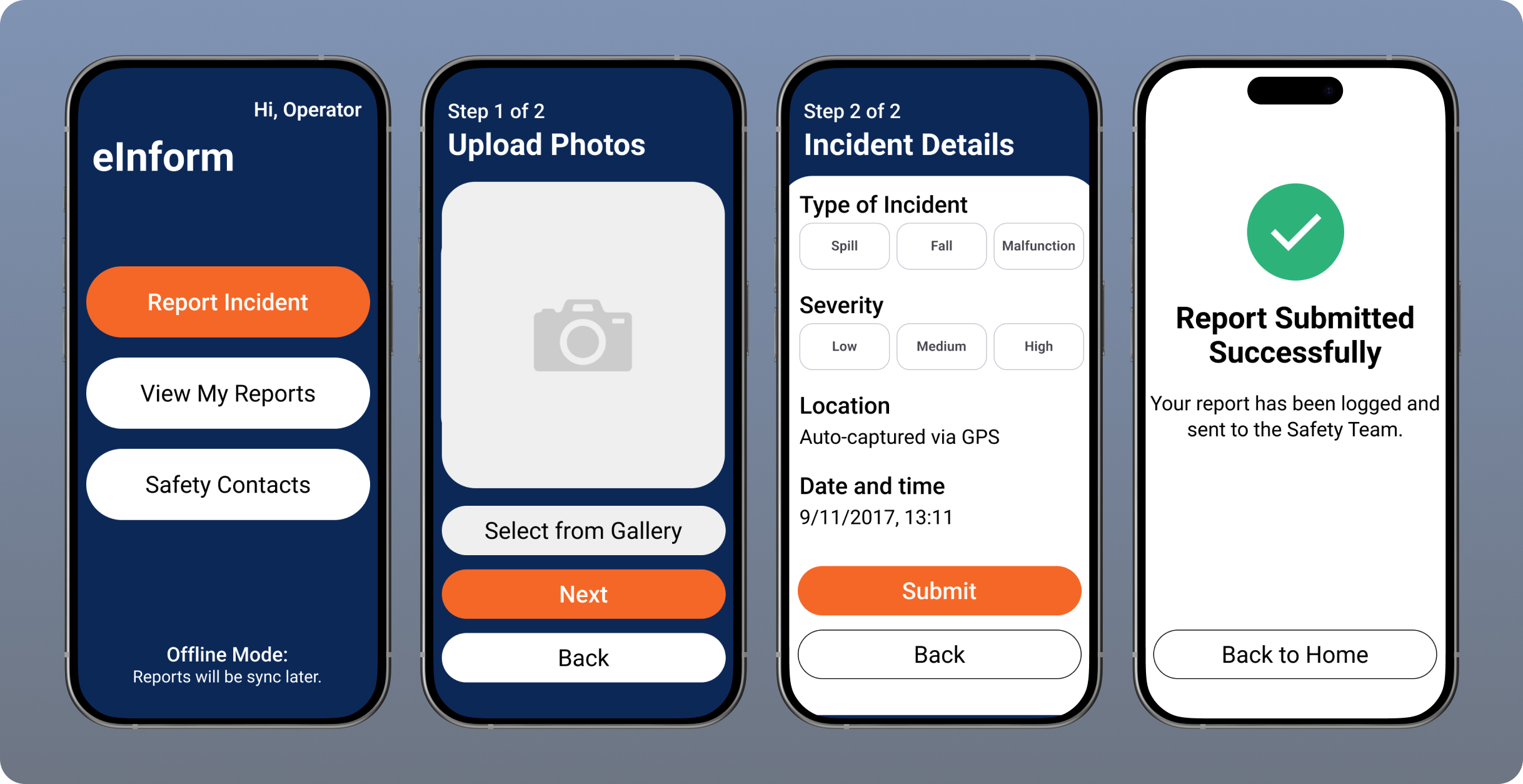
I then tested the prototype with a small group of port operators in real working conditions, the results were encouraging:
-
Report submission time dropped from 15 minutes to under 1 minute.
-
Operators found the larger buttons more comfortable to use with gloves.
-
Automatic location capture eliminated repetitive typing.
-
Even in bright sunlight, the interface remained legible.
Designing for Human Factors and Ergonomics
One of the most interesting aspects of this project was integrating human factors into the design process.
We often talk about empathy in UX, but empathy isn’t just emotional — it’s also physical. Observing how people use their hands, how they shift their weight, and how they interact with their environment can reveal design opportunities you won’t find in interviews alone.
By acknowledging these factors early, I was able to design an interface that felt natural in context — one that respected the limitations and demands of real-world use.
Impact
After rollout, eInform significantly improved the speed and completeness of incident reports. Safety teams began receiving reports in near real-time, allowing them to respond faster and with better situational awareness.
The tool also encouraged a culture of proactive safety reporting, since operators no longer felt burdened by the process. The app fit seamlessly into their workflow — it worked with them, not against them.
Reflection
Looking back, eInform was one of the most rewarding projects I’ve worked on because it combined technical, environmental, and human challenges into one design.
It reminded me that good UX isn’t only about screens — it’s about context, ergonomics, and empathy. Designing for users in controlled environments is one thing; designing for users who operate heavy machinery in sunlight and noise is something else entirely.
This project reaffirmed my passion for creating products that sit at the intersection of physical and digital design, where usability is measured not just in clicks, but in comfort, safety, and real-world impact.